Announcement
[A version of this message was sent to Brown Web Editors Group (BWEG) subscribers via email on May 1, 2025]
Thank you for joining our community. This marks our inaugural Brown Web Editors (BWEG) communication, and we’re sharing details about two new components now available in Drupal Cloud.
You can use these components on University websites across the platform:
Link Tiles Component
A Link Tile is a collection of related links presented in a distinct visual format. Each tile consists of a title, brief description, and up to six links displayed together in a single block.
Link tiles are ideal when it is necessary to present a set of related links to users. They help group links and provide context (through descriptions) for sets of links, making it easier for users to find what they need compared to a large, unsorted list of links.
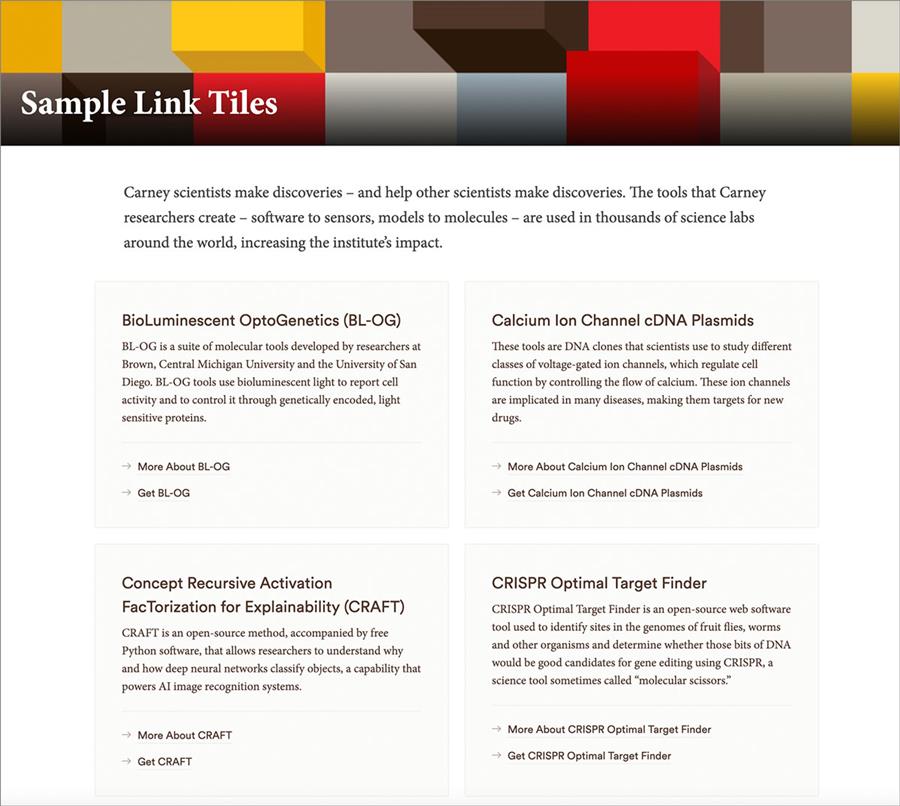
While these tiles help organize link collections, it's important to avoid "link clutter" on your websites. Don't add large lists of links—whether using Link Tiles or other components—without a clear purpose that serves your users. For instance, there's rarely a need to link to numerous departments and offices across Brown, since users can find these through high-level search and navigation menus. Excessive linking harms the user experience and can negatively impact a webpage's search engine rankings, since search engines prioritize user-focused, well-structured content.
Learn more about Link Tiles:
- Read the full announcement about the release of Link Tiles
- Review the Usage Guide for Link Tiles, which provides essential information on the optimal use of Link Tiles
Image Section Break Component
The newly released Image Section Break combines a full-width image with a text heading/description. Built for full-width pages (those without a left-column menu), it provides a more engaging way to organize content compared to standard section breaks.

We've created a sample page to demonstrate this component, since it's easier to understand when seen in practice. The "Scholarship that Transcends Boundaries," "Brown and Providence," and the aerial image above "Brown's Mission" on this page demonstrate how the Image Section Break appears on a Brown webpage.
Adding this component to Drupal Cloud pages initially requires assistance from OUC by emailing [email protected]. Our team can help ensure you have the appropriate page type, content strategy, and images for adding this component effectively. Once the component is placed, web content editors can freely edit or remove it from their page.
Learn more about Image Section Breaks:
- See the sample page using Image Section Breaks
- Read the full announcement about the release of Image Section Breaks
- Review the Usage Guide for Image Section Breaks