Announcement
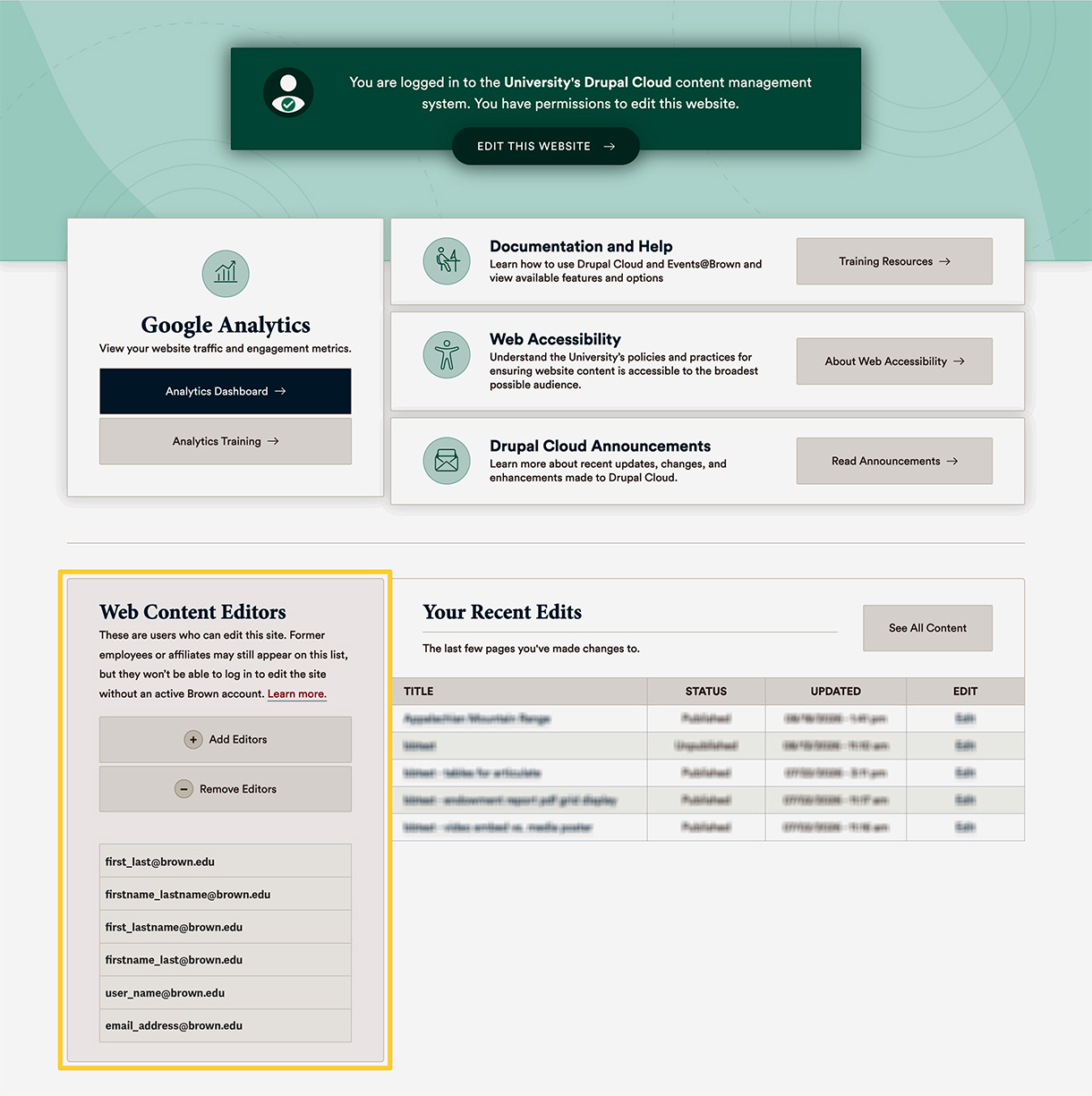
A list of web content editors now appears on the Drupal Cloud login page. When logged in, editors will see a list of the individuals with editor access to the site they are viewing. This gives site editors and owners greater visibility into the sites they manage.
After logging into a Drupal Cloud site, a list of Web Content Editors appears on the user page (mysite.brown.edu/user), below the Google Analytics dashboard link and alongside recently edited pages. This feature provides a quick way to see who has access to make changes to a site, understand how editing responsibilities are distributed, and ensure there is appropriate coverage for web content updates if teams, roles, or responsibilities change.
Understanding Your Site's Editor List
The editor list for your site may include individuals outside of your immediate office, department or unit, such as:
- OUC and OIT staff who provide content, testing, infrastructure and security support across the University.
- Members of a communications office who may help support your site if it’s part of a larger school, division, or unit. For example, staff in the Office of BioMed Communications have editor access to most BioMed sites at Brown.
Please note that OUC and OIT staff won't make changes to your site unless you ask, or in rare instances where critical University business (like compliance) requires it.
If a Former Editor Is Listed
As roles and responsibilities change over time, your editor list may include individuals whose roles or departments have changed since they were originally given access.
- Former editors still at Brown: Editors who move to a different department or role within Brown can continue to access a site as long as they have an active Brown account and remain on your editor list. If they should no longer be an editor, you can request access be removed.
- Former editors who have left Brown: Once someone leaves Brown, they can no longer authenticate using their former Brown credentials. Therefore, individuals who have left Brown cannot access or edit a site, even if their name still appears on your editor list. Even though they can't log in or make changes, we still recommend removing their editor access as a security best practice.
Reviewing your editor list periodically is a good way to confirm that it’s up to date and accurate, as well as to ensure you have more than one editor in place who can make updates if a primary editor is unavailable.
Add or Remove Editors
If editor access needs to be updated, you can submit an Add Editor Access or Remove Editor Access form. Links to both forms are also available directly from the editor list on the Drupal Cloud login page.
Please note, removing a user does not impact any content they may have authored or edited.